
Top Game Boy Advance Emulators for 2025: Play GBA Classics on Your PC and Mobile
The Game Boy Advance (GBA) was one of Nintendo's most iconic handheld consoles, with a rich library of games that shaped the childhood of millions. From the Pokémon series to The Legend of Zelda: A Link to the Past, the GBA continues to hold a special place in the hearts of gamers. Thanks to emulators, it's now easier than ever to enjoy these timeless classics on modern devices like your PC, Mac, or smartphone.
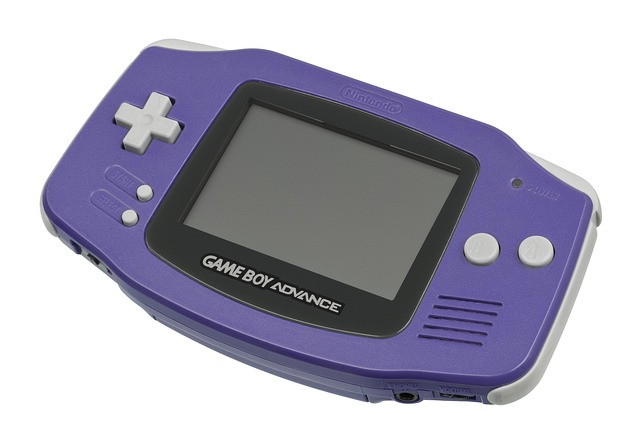
In this blog, we’ll explore some of the best Game Boy Advance emulators available in 2025, all of which offer great performance and features to help you relive your favorite GBA memories.
1. VisualBoyAdvance (VBA-M)
Platform: Windows, Mac, Linux
Key Features:
- Save states for quick game progress.
- Fast-forwarding to speed up gameplay.
- Compatible with a wide range of GBA games.
- Support for cheat codes and custom controls.
2. mGBA
Platform: Windows, Mac, Linux, 3DS, WiiU
mGBA is a relatively newer emulator that is known for its high level of accuracy and performance. It’s lightweight and runs smoothly on both low-end and high-end systems, making it a great choice for users with older devices. mGBA supports advanced features like rewind, custom shaders, and cheat codes, which enhance the overall gaming experience.
Key Features:
- High accuracy for authentic gameplay.
- Rewind function to undo mistakes.
- Customizable control mappings.
- Fast performance on a variety of devices.
3. No$GBA
Platform: Windows
No$GBA (short for No Cash GBA) is a fast, minimalistic emulator designed for high performance. Originally designed for GBA and Nintendo DS emulation, No$GBA is known for its low system requirements and ability to run games smoothly even on older computers. The emulator offers debugging tools for developers, but it’s also user-friendly for casual players.
Key Features:
- Excellent performance with low system requirements.
- Dual support for GBA and DS games.
- Save state functionality for quick access to game progress.
- Debugging tools for advanced users and developers.
4. GBA4iOS
Platform: iOS (iPhone/iPad)
For iOS users, GBA4iOS is one of the best ways to play GBA games without the need for jailbreaking your device. This emulator offers an intuitive interface, supports cheat codes, and even features cloud syncing for saved games. With its robust performance and customizable controls, GBA4iOS is a must-have for mobile gamers.
Key Features:
- Touchscreen controls for an immersive mobile experience.
- Cloud syncing to save progress across devices.
- Support for external controllers.
- Save/load state functionality.
5. RetroArch
Platform: Windows, Mac, Linux, Android, iOS
RetroArch is an all-in-one emulator that supports a wide range of gaming consoles, including the Game Boy Advance. It uses "cores" to emulate different systems, and for GBA, the Gambatte or mGBA cores are popular choices. RetroArch is especially great for users who want a single platform to emulate multiple systems. It offers plenty of customization options and even multiplayer capabilities for a shared gaming experience.
Key Features:
- Supports a variety of gaming platforms (GBA, SNES, PlayStation, and more).
- Netplay support for online multiplayer.
- Highly customizable settings and graphical enhancements.
- External controller support.
6. John GBA
Platform: Android
John GBA is a highly regarded emulator for Android users. It offers a smooth experience for playing GBA games on your mobile device, with support for save states, cheat codes, and even hardware controller support. Whether you’re on the go or relaxing at home, John GBA makes it easy to play your favorite GBA titles on Android.
Key Features:
- High compatibility with most GBA games.
- Customizable on-screen controls or support for external controllers.
- Save/load states for uninterrupted gaming.
- Cheats and graphical enhancements.
7. OpenEmu
Platform: MacOS
If you're a Mac user, OpenEmu is a fantastic choice for emulating GBA games. It boasts an elegant interface and powerful emulation features. OpenEmu automatically organizes your games, displaying them with artwork and metadata. It also supports multiple consoles, allowing you to play not just GBA games, but games from other retro systems like the NES, SNES, and Game Boy.
Key Features:
- Beautiful user interface with automatic metadata and artwork.
- Support for multiple consoles.
- Full-screen and windowed modes.
- Gamepad support for external controllers.
- Easy-to-use controls and setup.
Conclusion
Whether you’re revisiting old classics like Pokémon FireRed or The Legend of Zelda: A Link to the Past, or discovering GBA gems for the first time, these emulators offer the best ways to enjoy your favorite games. From PCs to smartphones, there’s an emulator for every platform, each packed with features that enhance the gaming experience.
Remember, always ensure you own the original GBA cartridges if you're downloading ROMs to stay compliant with copyright laws. With these emulators, you’re just a few clicks away from reliving the magic of the Game Boy Advance!
Which GBA emulator is your favorite, and what game are you most excited to play? Let us know in the comments below!


0 Comments